The Big Picture
Livetran is built with a modular, event-driven architecture that ensures reliability and scalability. Each component has a specific role, working together to deliver a seamless streaming experience. Here’s a visual representation of the architecture: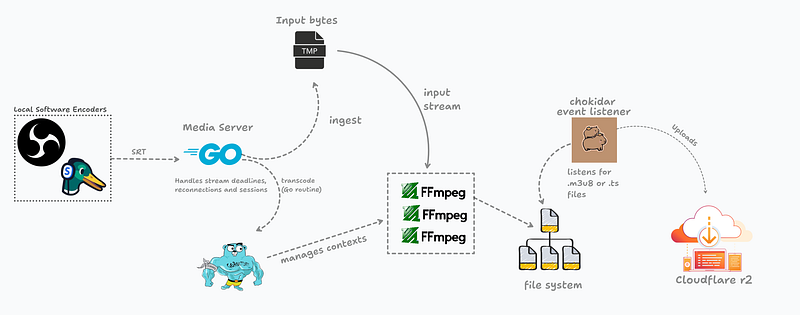
Architecture Components
1. API Server (internal/http/server.go)
The HTTP server handles all REST API requests and serves as the entry point for stream management. It runs on HTTPS (port 8080 by default) and includes:
- Request Authentication: HMAC-SHA256 signature verification middleware
- CORS Support: Enabled for cross-origin requests
- OpenTelemetry Integration: Optional metrics collection and export
- Graceful Shutdown: Handles SIGTERM/SIGINT signals cleanly
2. Task Manager (internal/ingest/task_manager.go)
The TaskManager is the central orchestrator that maintains the state of all active streams. It’s an in-memory store that:
- Tracks stream lifecycle (INITIALISED → READY → STREAMING → STOPPED)
- Manages webhook notifications
- Coordinates SRT listener creation and cleanup
- Provides metrics data for observability
- Unique
stream_id - Current status
- Webhook URLs for status updates
- ABR configuration flag
- Context cancellation function for graceful shutdown
3. SRT Ingestion (internal/ingest/srt_task.go)
The SRT ingestion layer handles incoming video streams:
- Dynamic Port Allocation: Each stream gets a unique, randomly allocated port
- JWT Stream Key Validation: Validates stream keys before accepting connections
- Connection Timeout: 120-second timeout if no encoder connects
- Reconnection Support: Handles encoder disconnections gracefully
- Stream Key Format:
mode=publish,rid={stream_id},token={jwt}
go-srt library and accepts MPEG-TS streams over SRT protocol.
4. FFmpeg Transcoding
FFmpeg processes the incoming SRT stream and converts it to HLS format: Single-Profile Mode (default):- Single HLS playlist with one video quality
- Output:
{stream_id}.m3u8and{stream_id}_XXX.tssegments - 4-second segments, keeps last 10 segments
abr=true):
- Three quality variants: 1080p (5Mbps), 720p (3Mbps), 480p (1.5Mbps)
- Master playlist:
{stream_id}_master.m3u8 - Variant playlists:
{stream_id}_0.m3u8,{stream_id}_1.m3u8,{stream_id}_2.m3u8 - Segments:
{stream_id}_{variant}_{segment}.ts
- Codec: H.264 (libx264) for video, AAC for audio
-
Preset:
veryfastfor low latency -
Tune:
zerolatencyfor real-time streaming - GOP size: 60 frames (2 seconds at 30fps)
- Audio: 48kHz, 128kbps
- NOTE: These can be easily changed by the user according to their usecase.
5. File Watcher & R2 Uploader (internal/upload/r2-helper.go)
The upload system monitors the output directory and automatically uploads files to Cloudflare R2:
- File Watching: Uses
fsnotifyto detect new.m3u8and.tsfiles - Retry Logic: 3 attempts with exponential backoff
- Content-Type Detection: Automatically sets correct MIME types
- Public URL Generation: Constructs public URLs from
CLOUDFLARE_PUBLIC_URLenv var - Callback on First Playlist: Triggers webhook with public URL when first playlist is uploaded
Data Flow: Step by Step
Step 1: Start Stream Request
Step 2: SRT Listener Setup
Step 3: Encoder Connection
Step 4: Streaming & Transcoding
Step 5: Playback
Stream States
Understanding the stream lifecycle is crucial for debugging and monitoring:- INITIALISED: Task created, SRT listener being set up
- READY: SRT URL generated, waiting for encoder connection
- STREAMING: Encoder connected, actively transcoding and uploading
- STOPPED: Stream ended (user stop, timeout, or error)
Error Handling
Livetran includes comprehensive error handling:- Port Allocation Failure: Stream marked as STOPPED, error in webhook
- SRT Listener Error: Stream marked as STOPPED, cleanup initiated
- Stream Key Generation Failure: Stream marked as STOPPED
- FFmpeg Process Errors: Connection retried, stream continues if encoder reconnects
- R2 Upload Failures: Retried 3 times with exponential backoff
- Connection Timeout: After 120 seconds without encoder, stream marked as STOPPED
Performance Considerations
- Concurrent Streams: Each stream runs in its own goroutine, allowing multiple simultaneous streams
- Memory Usage: In-memory task store; consider persistence for production
- Disk I/O: HLS files written locally before upload; ensure sufficient disk space
- Network: R2 uploads happen asynchronously; network issues don’t block transcoding
- CPU: FFmpeg encoding is CPU-intensive; monitor CPU usage per stream
Security Features
- HMAC Request Signing: All API requests must be signed
- JWT Stream Keys: Time-limited, stream-specific authentication
- TLS/HTTPS: Server requires TLS certificates
- Stream Key Validation: Rejects invalid or expired keys
- Connection Isolation: Each stream uses a unique port and key
Next Steps
- Learn about Authentication for API and stream security
- Understand Ingestion details for SRT connections
- Explore Uploading for R2 configuration
- Check Deployment for production setup